
Online Book Ordering Instructions
- Go to the M State website.
From the Quick Links menu at upper right, choose SpartanNet and log in.

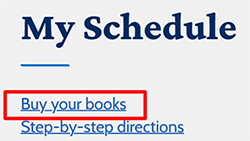
Scroll toward the bottom of the page and click "Buy Your Books."
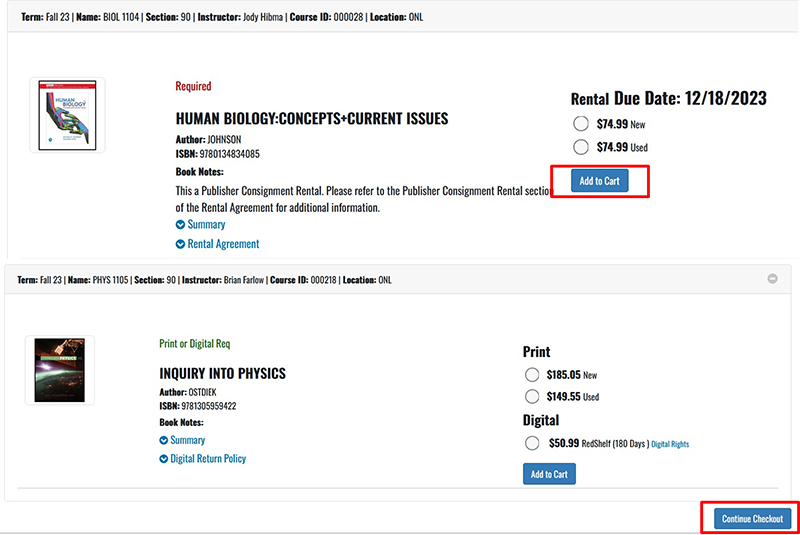
Just the books for the courses you are registered for will appear for you to select. If you do not add an item, it will not be sold to you. We try to fill according to your preference but will fill your order with the condition we have available.
Select the desired book condition for each item then Add to Cart. Continue to Checkout.
- The next screen will show an order summary. Click on Checkout.
- A series of pop-ups will appear. Answer the questions in the pop-ups and click Continue.
- The screen will change to show your order summary with your chosen preferences. Click Payment Options.
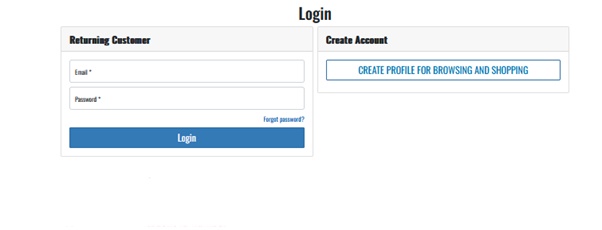
In the email field under Returning Customer, use your school email: firstname.lastname@go.minnesota.edu. If this is your first time ordering textbooks, your login is your school email: firstname.lastname@go.minnesota.edu. Password is your eight-digit student ID number.
Under "Payment Options," choose a payment method. The screen will update depending on the chosen method. For the financial aid option (charging to your account), use your student ID number, not your StarID.

A successfully submitted order will show “Thank You For Your Order!” and your order number. After your order has been placed you will receive an email from the bookstore acknowledging receipt of your order.
Shipping selected: you will receive an “Order has shipped” email with UPS tracking information.
Pickup in store: we will send a text message when the order is ready for pickup.